
IPHost Network Monitor provides constant monitoring of network’s services and resources that are critically important for your company. Unlike many monitoring tools IPHost Network Monitor checks not only the availability of a resource but also its operability and performance characteristics.
The base element in IPHost Network Monitor is a monitor; it checks the availability of a service on a remote or local computer and requests a value of a certain parameter. The monitor has parameters that determine: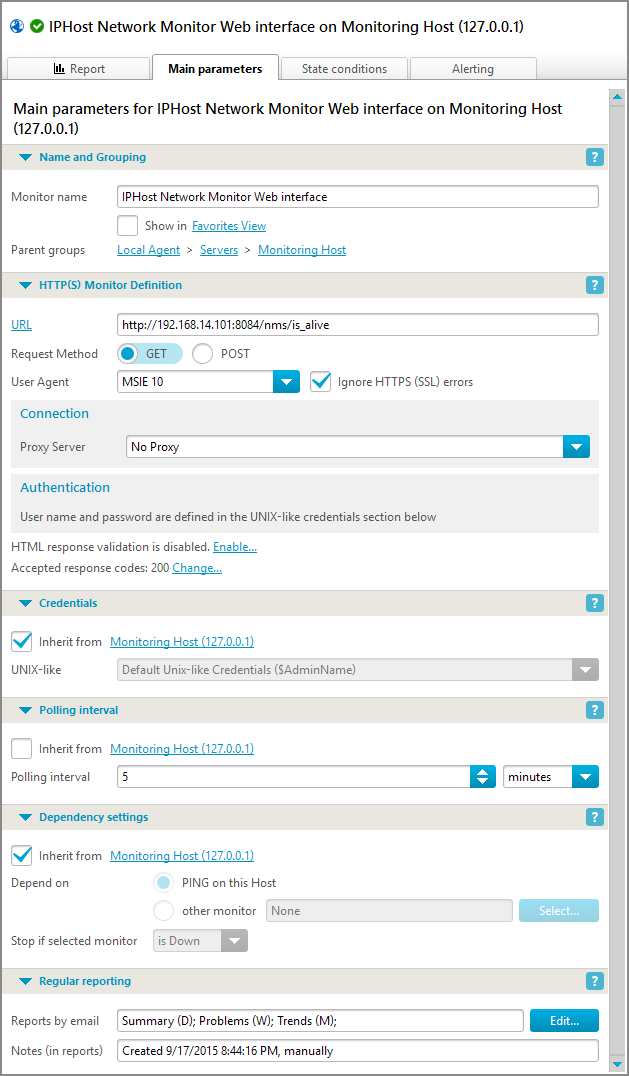
- monitor name,
- monitor definition (what and how should be checked — monitoring parameters),
- time interval between polls,
- dependency settings: should the monitor change its state after another monitor has changed its state,
- what kind of reports should be sent and how often.
You can set the conditions that define when the monitor should change its state on State conditions tab. You can specify what alerts should the monitoring service send if the monitor changes its state or event occurs.
Groups of Monitors
Grouping monitors in accordance with host types and monitor types provides a convenient way to manage the monitoring system. For example, you can create a host group for each location and organize your hosts (servers) accordingly.
Available Monitor Types
| SNMP | Standard way of retrieving management information and performance characteristics from Unix/Linux servers, Windows servers, networking and other equipment. 70 common MIBs are provided with the product. |
| PING | Sends a standard PING to the server/device |
| TCP | Checks whether the server accepts connection at the specified port number |
| UDP | UDP datagram send/receive on a specific port |
| SMTP | Checks an SMTP server with optional authentication and sends a test message |
| POP3 | Checks a POP3 server with optional authentication |
| IMAP | Checks an IMAP server with optional authentication |
| HTTP/HTTPS | GET or POST HTTP/HTTPS request with optional content validation |
| Web Transaction Monitor | This tool simulates the steps of activity of a real user of web application or e-commerce site customer. With Web Transaction Monitor you can check web application availability and performance. |
| FTP | Checks an FTP server with optional authentication |
| DNS | DNS server monitoring |
| WMI CPU load | Checks current CPU load on remote computer via WMI |
| WMI Available Memory | Checks current volume of available memory on remote computer via WMI |
| WMI Bytes Received/sec | Checks current inbound throughput on remote computer |
| WMI Bytes Send/sec | Checks current outbound throughput on remote computer |
| WMI Custom (run WMI script) | Runs custom WMI script to check some value on remote computer |
| DISKSPACE | Monitors the free disk space of a local disk drive or a remote network share |
| FILE | Monitors a file on a local disk drive or a network share. It checks if the file exists and the file size is in a given range |
| Windows Service | Monitoring the presence of any Windows service on the local machine or a computer in the network. You can restart the service using the Run program action. |
| ODBC Database | Checks an ODBC data source for availability with optional authentication and SQL expression execution. You can use it to monitor Oracle, MS SQL server and other databases. |
| Oracle Database | Checks an Oracle database for availability with optional authentication and SQL expression execution. |
| MySQL Database | Checks a MySQL database for availability with optional authentication and SQL expression execution. Using of secure connection is also supported that is especially important if you monitor hosted database. |
| MS SQL Database | Checks a MS SQL database for availability with optional authentication and SQL expression execution. |
| WMI Traffic Speed | Calculates incoming, outgoing or total traffic speed (average for a polling interval) on the specified network interface using data provided by the target host WMI service. |
| WMI Traffic Volume | Calculates incoming, outgoing or total traffic volume on the specified network interface for specified timeframe using data provided by the target host WMI service. |
| SNMP Traffic Speed | Calculates incoming, outgoing or total traffic speed (average for a polling interval) on the specified network interface using data provided by the target host SNMP service. |
| SNMP Traffic Volume | Calculates incoming, outgoing or total traffic volume on the specified network interface for specified timeframe using data provided by the target host SNMP service. |
| Script or Program | Makes it easy to create your own custom monitors. Scripts and programs are supported. You can use Nagios plugins. |
| SSH (Remote Script or Program) | Allows you to run commands on other computers over SSH and to integrate IPHost with other systems deployed remotely. |
| SNMP Generic Trap | Listens for the SNMP v1 / v2c traps sent by SNMP-enabled devices such as routers. |
| SNMP Custom | Monitors the SNMP v1 / v2c / v3 performance counters such as network traffic or system resources on any SNMP-enabled device. |
| SNMP CPU | Measures CPU usage parameters (total, user time, system time and other parameters) using data provided by SNMP agent on target host. |
| SNMP Memory | Measures memory usage parameters (free, used for either physical memory or swap space) using data provided by SNMP agent on target host. |
| SNMP Disk space | Measures free or used disk space for a specified filesystem using data provided by SNMP agent on target host. |
| SNMP Process | Shows various parameters (number of processes, CPU and memory usage) of specified process using data provided by SNMP agent on target host. |
| SSH CPU | Measures CPU usage parameters using data provided by SSH script running on target host. |
| SSH Memory | Measures memory usage parameters using data provided by SSH script running on target host. |
| SSH Disk space | Measures free or used disk space for a specified filesystem using data provided by SSH script running on target host. |
| SSH Process | Shows various parameters of specified process using data provided by SSH script running on target host. |
| WMI CPU | Measures CPU usage parameters using data provided by WMI service on target host. |
| WMI Memory | Measures memory usage parameters using data provided by WMI service on target host. |
| WMI Disk space | Measures free or used disk space for a specified filesystem using data provided by WMI service on target host. Note: Unlike generic Disk space monitor this monitor does not require the monitored filesystem to be a network shared resource. |
| WMI Process | Shows various parameters (number of processes, CPU and memory usage) of specified process using data provided by WMI service on target host. |
| WMI Uptime | Shows target host uptime in days according to data provided by WMI service. |
Polling
Monitors are polled (checked) with a regularity specified by the user. By default, ‘Basic connectivity’ monitors are checked every 30 seconds, all the rest — every minute. A minimum interval between polls is limited to 1 second, but it is not recommended to use polling interval fewer than 15 seconds because more frequent checks are practically useless, besides, they can lead to the performance degradation of the network or network resources, which contradicts with the goal of monitoring. The result of a check is either a value or an error message. Depending on returned value monitor stays in OK state or turn into one of two problem states:
- Performance Warning
- Down
IPHost Network Monitor reacts to monitor transitions to problem states by performing alerts assigned by the user to the corresponding state. The alerts are set in Alerting Rules.
Dependencies
 You can make the monitor dependent on the state of another monitor. This means that the dependent monitor is checked only if the monitor on which it depends is in a state different from Down, Stopped or Stopped by Dependency. For example, you can make all the monitors in a subned dependent from PING monitor to a gateway to this subnet. By default, a monitor inherits its dependency setting from its parent host, the default dependency is PING monitor on its parent host.
Admin Tools
IPHost Network Monitor provides interfaces to some tools that help you to manage your hosts (servers) from the client GUI directly. There are:
- SSH client
- Telnet client
- Remote Desktop client
You can configure the interfaces on Settings-> Admin Tools page. Also, you can also specify a path to device web interface on a host Main parameters tab.
Other features description:
| Network Discovery | Helps you to create a basis of your monitoring configuration and automates the task of detection network hosts and network services. |
| Alerting Features | Here you can find the list of alert types (ways of reaction to the problems happened during monitoring) available in IPHost Network Monitor, and their brief description. |
| Reporting Features | Here you can find the list of report types available in IPHost Network Monitor with brief descriptions. |
| IPHost Network Monitor interfaces and structure | Here you can find an overview of IPHost Network Monitor components, Windows and web interfaces. |
Comments are closed.